



After months of testing, WhatsApp has finally rolled out dark mode for beta users on Android. If you are a WhatsApp Beta user, then update to the latest version (v2.20.13) of the app from the Google Play Store in order to use the newly introduced dark mode.
WhatsApp is one of the few commonly used apps not to have a dark mode. Thankfully, the firm started working to bring this long-awaited feature early last year. However, it took them nearly one year to roll the update to beta users. We are not sure when it will hit the regular users but it will be eventually made available to them if there’s no bug such as UI glitches.
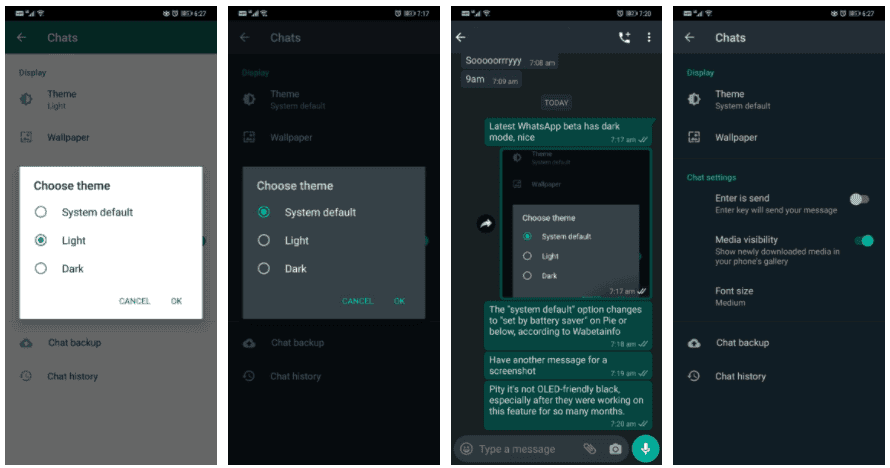
Although WhatsApp has finally gained the night mode, the theme is not OLED-friendly pure black but rather it is a combination of dark grey and green colours. But at least it is better than not having a night mode at all. To enable dark mode on WhatsApp, go to Settings -> Chats -> Theme and select Dark. There is even a System default option, selecting which the app will turn light or dark based on your system theme. This option will only work on Android 10 and Android 9 Pie (if battery saver is turned on).
Anyways, if you are a not a WhatsApp beta user and want to try the dark mode, then download and install the latest beta APK from the link provided below.



Place comments
0 Comments
You are currently seeing only the comments you are notified about, if you want to see all comments from this post, click the button below.
Show all comments